

Forums/myPhoneDesktop Integration
Address Book Plugin "Send SMS with myPhoneDesktop"

Alex Krivov
posted this on Mar-30 2010 23:09
This is a Beta version of plug-in/script to integrate myPhoneDesktop with Apple's Address Book (as an Address Book Plug-in)
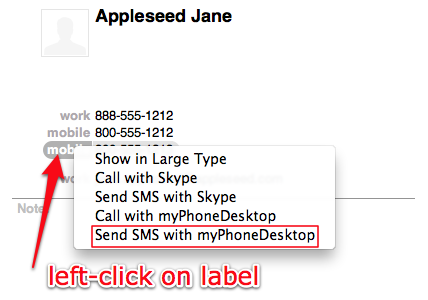
With this plug-in installed you would be able to click (left click) on any SMS message capable phone number and send it to myPhoneDesktop.
- Copy attached script to the Address Book Plug-Ins Folder ("~/Library/Address Book Plug-Ins/")
- Restart Address Book if it is running
- Now you can click (left click) on any SMS message capable phone number and choose "Send SMS with myPhoneDesktop"
- Type your SMS shown dialog and click "Send SMS" to send phone number and SMS to myPhoneDesktop
Script will also check if myPhoneDesktop is running and will check if "Enable access for assistive devices" option is turned ON in System Preferences | Universal Access. "Enable access for assistive devices" is required for UI scripting.
Note, this plug-in works on the following platforms:
- Mac OS X Snow Leopard (64bit Intel platform)
- Mac OS X Leopard (64bit Intel platform)
Feel free to improve or extend this script.
Version Information: 1.0 Beta 3, released 03/30/2010
